
ScrumOps
So you’ve heard of DevOps, FinOps, DevSecOps - what all of these have in common is that they embrace command line tools as being more productive than the desktop or the browser.
We believe this is true for Agile/Scrum project management too.
Scrum meetings are supposed to be fast-paced, however, this is invariably slowed down while the scrum master faffs around in Jira or Trello finding and updating the ticket and then finding and viewing the next ticket.
Taiga
Clearly a good agile project management web-based system is still required. We are using Taiga as this component. We’ve even got extensions for this to provide an email API for ticketing.
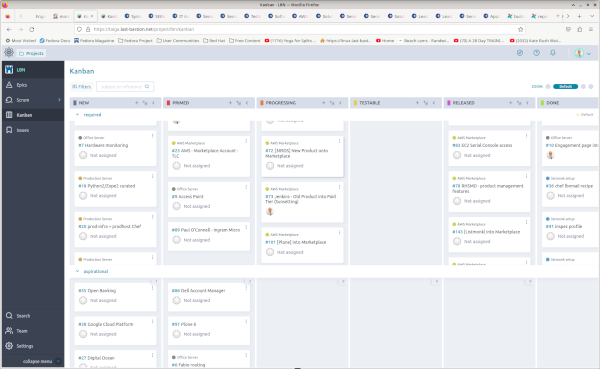
Taiga has an excellent RESTFul API - and we do need API’s to create a command-line client. The better the API’s - the more featureful the client.
Taiga also has a migration path from some other popular project management platforms.
Project management is filled with philosophies, methodologies, and nomenclature that is by no means universally agreed. We’re cutting through all that - and if it’s not represented within Taiga, it’s off the table. So we talk about Epics, User Stories, Tasks, Issues, Sprints, Swimlanes, Projects all within the context of what is implemented within Taiga.
Command Line
We’ve used the wonderful python click libraries to create a
fantastic command to speed up your stand-ups. And the best thing about it is err
bash - because history… you can easily find and run yesterdays commands
today.
$ taiga stories list <project>
$ taiga tasks update <project> --status done --ref 24 --ref 36
$ taiga config show
Options
taiga
Taiga scrum management command line tool
In a nutshell:
Usage
taiga [OPTIONS] COMMAND [ARGS]...
Options
- -v, --verbosity <LVL>
Either CRITICAL, ERROR, WARNING, INFO or DEBUG
- --version
Show the version and exit.
auth
set up and/or refresh your access keys
Usage
taiga auth [OPTIONS] COMMAND [ARGS]...
Options
- -v, --verbosity <LVL>
Either CRITICAL, ERROR, WARNING, INFO or DEBUG
login
retrieve your API key using login credentials
Usage
taiga auth login [OPTIONS] USERNAME PASSWORD
Options
- -u, --url <url>
Taiga URL
- Default:
'https://taiga.last-bastion.net'
Arguments
- USERNAME
Required argument
- PASSWORD
Required argument
logout
remove access token from configuration
Usage
taiga auth logout [OPTIONS]
refresh
refresh your API key
if your key has expired; you will have to do another login
Usage
taiga auth refresh [OPTIONS]
config
customise your taiga tool
you can edit your ~/.taiga.yaml to change how this tool behaves.
Usage
taiga config [OPTIONS] COMMAND [ARGS]...
Options
- -v, --verbosity <LVL>
Either CRITICAL, ERROR, WARNING, INFO or DEBUG
reset
reset your configuration to system defaults
Usage
taiga config reset [OPTIONS]
show
show your taiga tool configuration
Usage
taiga config show [OPTIONS]
Options
- -o, --output-format <output_format>
Output format
- Default:
'yaml'- Options:
json | yaml
write
write your taiga tool configuration
Usage
taiga config write [OPTIONS]
Options
- -o, --output-format <output_format>
Output format
- Default:
'yaml'- Options:
json | yaml
epics
manage project epics
Usage
taiga epics [OPTIONS] COMMAND [ARGS]...
comment
add a comment to an epic
Usage
taiga epics comment [OPTIONS] PROJECT [REF]...
Options
- -c, --comment <comment>
Required your comment text
Arguments
- PROJECT
Required argument
- REF
Optional argument(s)
create
create an epic in PROJECT
Usage
taiga epics create [OPTIONS] PROJECT
Options
- -s, --subject <subject>
Required short title
- -d, --description <description>
more details
Arguments
- PROJECT
Required argument
delete
remove epic(s) from a project
Usage
taiga epics delete [OPTIONS] PROJECT [REF]...
Arguments
- PROJECT
Required argument
- REF
Optional argument(s)
get
retrieve full epic details
Usage
taiga epics get [OPTIONS] PROJECT REF
Options
- -a, --all
Arguments
- PROJECT
Required argument
- REF
Required argument
issues
display the issues in this story(s)
Usage
taiga epics issues [OPTIONS] PROJECT [REF]...
Arguments
- PROJECT
Required argument
- REF
Optional argument(s)
list
list epics in project (or all)
Usage
taiga epics list [OPTIONS] [PROJECT]...
Arguments
- PROJECT
Optional argument(s)
story
create a story within an epic
Usage
taiga epics story [OPTIONS] PROJECT REF
Options
- -s, --subject <subject>
Required short title
- -d, --description <description>
more details
- -i, --status <status>
initial status
- -i, --assign <assign>
assigned to
Arguments
- PROJECT
Required argument
- REF
Required argument
tagadd
add a tag(s) to an epic
Usage
taiga epics tagadd [OPTIONS] PROJECT [REF]...
Options
- -t, --tag <tag>
Required your tag; you can use this multiple times
Arguments
- PROJECT
Required argument
- REF
Optional argument(s)
tagrm
remove tag(s) from an epic
Usage
taiga epics tagrm [OPTIONS] PROJECT [REF]...
Options
- -t, --tag <tag>
Required your tag; you can use this multiple times
Arguments
- PROJECT
Required argument
- REF
Optional argument(s)
tasks
display the tasks in this story(s)
Usage
taiga epics tasks [OPTIONS] PROJECT [REF]...
Arguments
- PROJECT
Required argument
- REF
Optional argument(s)
update
edit the epic
Usage
taiga epics update [OPTIONS] PROJECT [REF]...
Options
- --status <status>
- --subject <subject>
- --blocked
- --closed
- --assigned <assigned>
Arguments
- PROJECT
Required argument
- REF
Optional argument(s)
issues
manage project issues
Usage
taiga issues [OPTIONS] COMMAND [ARGS]...
Options
- -v, --verbosity <LVL>
Either CRITICAL, ERROR, WARNING, INFO or DEBUG
comment
add a comment to an issue
Usage
taiga issues comment [OPTIONS] PROJECT [REF]...
Options
- -c, --comment <comment>
Required your comment text
Arguments
- PROJECT
Required argument
- REF
Optional argument(s)
create
Usage
taiga issues create [OPTIONS] PROJECT
Options
- -s, --subject <subject>
Required short title
- -d, --description <description>
Required more details
- -p, --priority <priority>
urgency
- -i, --status <status>
initial status
- -t, --issue-type <issue_type>
issue type
- -c, --severity <severity>
criticality/impact
- --due <due>
due date
Arguments
- PROJECT
Required argument
delete
remove issue(s) from a project
Usage
taiga issues delete [OPTIONS] PROJECT [REF]...
Arguments
- PROJECT
Required argument
- REF
Optional argument(s)
get
retrieve full issue details
Usage
taiga issues get [OPTIONS] PROJECT REF
Options
- -a, --all
Arguments
- PROJECT
Required argument
- REF
Required argument
list
list issues of project (or all)
Usage
taiga issues list [OPTIONS] [PROJECT]...
Options
- -a, --attr <attr>
only specific attribute
- -s, --status <status>
only specific status
Arguments
- PROJECT
Optional argument(s)
tagadd
add a tag(s) to an issue
Usage
taiga issues tagadd [OPTIONS] PROJECT [REF]...
Options
- -t, --tag <tag>
Required your tag; you can use this multiple times
Arguments
- PROJECT
Required argument
- REF
Optional argument(s)
tagrm
remove tag(s) from an issue
Usage
taiga issues tagrm [OPTIONS] PROJECT [REF]...
Options
- -t, --tag <tag>
Required your tag; you can use this multiple times
Arguments
- PROJECT
Required argument
- REF
Optional argument(s)
update
Usage
taiga issues update [OPTIONS] PROJECT REF
Options
- --status <status>
- --subject <subject>
- --severity <severity>
- --issue-type <issue_type>
- --priority <priority>
- --description <description>
- --assigned <assigned>
Arguments
- PROJECT
Required argument
- REF
Required argument
members
manage memberships for [server] users
a membership is a role within a project
Usage
taiga members [OPTIONS] COMMAND [ARGS]...
Options
- -v, --verbosity <LVL>
Either CRITICAL, ERROR, WARNING, INFO or DEBUG
create
add new user as a project/team member
Usage
taiga members create [OPTIONS] PROJECT
Options
- --email <email>
Required
- --role <role>
Required
- --password <password>
Required
- --full-name <full_name>
Required
- --accepted-terms
Arguments
- PROJECT
Required argument
delete
remove user as project/team member
Usage
taiga members delete [OPTIONS] EMAIL PROJECT
Arguments
- EMAIL
Required argument
- PROJECT
Required argument
link
add existing user as a project/team member
Usage
taiga members link [OPTIONS] PROJECT
Options
- --email <email>
Required email (or username) of member
- --role <role>
Required
Arguments
- PROJECT
Required argument
list
list members
Usage
taiga members list [OPTIONS] [PROJECT]...
Options
- -a, --attr <attr>
only specific attribute
Arguments
- PROJECT
Optional argument(s)
projects
manage projects
Usage
taiga projects [OPTIONS] COMMAND [ARGS]...
comment
add a comment to an project
Usage
taiga projects comment [OPTIONS] PROJECT
Options
- -c, --comment <comment>
Required your comment text
Arguments
- PROJECT
Required argument
create
create a new project
Usage
taiga projects create [OPTIONS] NAME
Options
- -d, --description <description>
Required The description of the project
- -t, --creation-template <creation_template>
creation template slug name
- Default:
'scrum'
- -p, --private
make the project private?
- Default:
False
Arguments
- NAME
Required argument
delete
delete project
Usage
taiga projects delete [OPTIONS] PROJECT
Arguments
- PROJECT
Required argument
get
returns details for creating issues/epics etc in the project
Usage
taiga projects get [OPTIONS] PROJECT
Options
- -a, --all
Full information
- Default:
False
Arguments
- PROJECT
Required argument
list
list projects
Usage
taiga projects list [OPTIONS]
Options
- -a, --attr <attr>
only specific attribute
members
show/assign team members to project
Usage
taiga projects members [OPTIONS] PROJECT
Options
- -r, --role <role>
Role name
- -u, --user <user>
Username/email
Arguments
- PROJECT
Required argument
tagadd
add a tag(s) to an project
Usage
taiga projects tagadd [OPTIONS] PROJECT
Options
- -t, --tag <tag>
Required your tag; you can use this multiple times
Arguments
- PROJECT
Required argument
tagrm
remove tag(s) from an project
Usage
taiga projects tagrm [OPTIONS] PROJECT
Options
- -t, --tag <tag>
Required your tag; you can use this multiple times
Arguments
- PROJECT
Required argument
update
Usage
taiga projects update [OPTIONS] PROJECT
Options
- --name <name>
- --description <description>
- --is-public
Arguments
- PROJECT
Required argument
search
search taiga
Usage
taiga search [OPTIONS] TEXT... COMMAND [ARGS]...
Options
- -v, --verbosity <LVL>
Either CRITICAL, ERROR, WARNING, INFO or DEBUG
- -p, --project <project>
project name to search
Arguments
- TEXT
Required argument(s)
server
manage your back-end taiga server
Usage
taiga server [OPTIONS] COMMAND [ARGS]...
Options
- -v, --verbosity <LVL>
Either CRITICAL, ERROR, WARNING, INFO or DEBUG
init
set up your taiga with our best-practice project templates
Usage
taiga server init [OPTIONS]
Options
- -s, --skip
skip if template already exists
- Default:
False
- -r, --refresh
refresh the templates with the latest copy here
- Default:
False
metrics
retrieve usage metrics
Usage
taiga server metrics [OPTIONS]
users
manage user access to your taiga
a user is an account/login
Usage
taiga server users [OPTIONS] COMMAND [ARGS]...
Options
- -v, --verbosity <LVL>
Either CRITICAL, ERROR, WARNING, INFO or DEBUG
delete
remove user
Usage
taiga server users delete [OPTIONS] USERNAME
Arguments
- USERNAME
Required argument
get
retrieves user details
Usage
taiga server users get [OPTIONS] USERNAME
Arguments
- USERNAME
Required argument
list
list users
Usage
taiga server users list [OPTIONS]
register
register a new user
Usage
taiga server users register [OPTIONS] USERNAME
Options
- --email <email>
Required
- --password <password>
Required
- --full-name <full_name>
Required
- --accepted-terms
- --public
send invitation (otherwise private)
- --private
private (no sending invitation)
Arguments
- USERNAME
Required argument
sprints
manage project sprints (ie milestones)
Usage
taiga sprints [OPTIONS] COMMAND [ARGS]...
Options
- -v, --verbosity <LVL>
Either CRITICAL, ERROR, WARNING, INFO or DEBUG
comment
add a comment to a sprint
Usage
taiga sprints comment [OPTIONS] ID
Options
- -c, --comment <comment>
Required your comment text
Arguments
- ID
Required argument
get
retrieve full epic details
Usage
taiga sprints get [OPTIONS] ID
Options
- -a, --all
Arguments
- ID
Required argument
issues
list issues within the sprint name
Usage
taiga sprints issues [OPTIONS] PROJECT SPRINT
Arguments
- PROJECT
Required argument
- SPRINT
Required argument
list
list sprints of project
Usage
taiga sprints list [OPTIONS] [PROJECT]...
Options
- -a, --attr <attr>
only specific attribute
Arguments
- PROJECT
Optional argument(s)
tagadd
add a tag(s) to an sprint
Usage
taiga sprints tagadd [OPTIONS] ID
Options
- -t, --tag <tag>
Required your tag; you can use this multiple times
Arguments
- ID
Required argument
tagrm
remove tag(s) from an sprint
Usage
taiga sprints tagrm [OPTIONS] ID
Options
- -t, --tag <tag>
Required your tag; you can use this multiple times
Arguments
- ID
Required argument
tasks
tasks within the sprint name
Usage
taiga sprints tasks [OPTIONS] PROJECT SPRINT
Arguments
- PROJECT
Required argument
- SPRINT
Required argument
update
edit the sprint
Usage
taiga sprints update [OPTIONS] ID
Options
- --name <name>
- --start <start>
- --finish <finish>
Arguments
- ID
Required argument
stories
manage project user stories
Usage
taiga stories [OPTIONS] COMMAND [ARGS]...
Options
- -v, --verbosity <LVL>
Either CRITICAL, ERROR, WARNING, INFO or DEBUG
comment
add a comment to an story
Usage
taiga stories comment [OPTIONS] PROJECT [REF]...
Options
- -c, --comment <comment>
Required your comment text
Arguments
- PROJECT
Required argument
- REF
Optional argument(s)
create
create a user story in (kanban) project
Usage
taiga stories create [OPTIONS] PROJECT
Options
- -s, --subject <subject>
Required short title
- -d, --description <description>
more details
- -i, --status <status>
initial status
- -a, --assign <assign>
assign to user
Arguments
- PROJECT
Required argument
delete
remove story(s) from a project
Usage
taiga stories delete [OPTIONS] PROJECT [REF]...
Options
- -s, --status <status>
story status
Arguments
- PROJECT
Required argument
- REF
Optional argument(s)
get
retrieve full user story details
Usage
taiga stories get [OPTIONS] PROJECT REF
Options
- -a, --all
Arguments
- PROJECT
Required argument
- REF
Required argument
issues
display the issues in this story(s)
Usage
taiga stories issues [OPTIONS] PROJECT [REF]...
Arguments
- PROJECT
Required argument
- REF
Optional argument(s)
list
list user stories of project (or all)
Usage
taiga stories list [OPTIONS] [PROJECT]...
Options
- -a, --attr <attr>
only specific attribute
- -s, --status <status>
only specific status
Arguments
- PROJECT
Optional argument(s)
tagadd
add a tag(s) to an story
Usage
taiga stories tagadd [OPTIONS] PROJECT [REF]...
Options
- -t, --tag <tag>
Required your tag; you can use this multiple times
Arguments
- PROJECT
Required argument
- REF
Optional argument(s)
tagrm
remove tag(s) from an story
Usage
taiga stories tagrm [OPTIONS] PROJECT [REF]...
Options
- -t, --tag <tag>
Required your tag; you can use this multiple times
Arguments
- PROJECT
Required argument
- REF
Optional argument(s)
tasks
display the tasks in this story(s)
Usage
taiga stories tasks [OPTIONS] PROJECT [REF]...
Arguments
- PROJECT
Required argument
- REF
Optional argument(s)
update
edit the story(s)
Usage
taiga stories update [OPTIONS] PROJECT [REF]...
Options
- --status <status>
- --subject <subject>
- --blocked
- --closed
- --assigned <assigned>
Arguments
- PROJECT
Required argument
- REF
Optional argument(s)
tasks
manage project tasks
Usage
taiga tasks [OPTIONS] COMMAND [ARGS]...
Options
- -v, --verbosity <LVL>
Either CRITICAL, ERROR, WARNING, INFO or DEBUG
comment
comment upon task
Usage
taiga tasks comment [OPTIONS] PROJECT REF
Options
- -c, --comment <comment>
Required comment upon task
Arguments
- PROJECT
Required argument
- REF
Required argument
create
create a task in a user story
Usage
taiga tasks create [OPTIONS] PROJECT STORYREF
Options
- -s, --subject <subject>
Required short title
- -d, --description <description>
more details
- --status <status>
- --assigned <assigned>
Arguments
- PROJECT
Required argument
- STORYREF
Required argument
delete
remove tasks(s) from a project
Usage
taiga tasks delete [OPTIONS] PROJECT [REF]...
Arguments
- PROJECT
Required argument
- REF
Optional argument(s)
get
retrieve full task details
Usage
taiga tasks get [OPTIONS] PROJECT REF
Options
- -a, --all
Arguments
- PROJECT
Required argument
- REF
Required argument
list
list tasks
Usage
taiga tasks list [OPTIONS] [PROJECT]...
Options
- -a, --attr <attr>
only specific attribute
- -s, --status <status>
only specific status
Arguments
- PROJECT
Optional argument(s)
tagadd
add a tag(s) to an story
Usage
taiga tasks tagadd [OPTIONS] PROJECT [REF]...
Options
- -t, --tag <tag>
Required your tag; you can use this multiple times
Arguments
- PROJECT
Required argument
- REF
Optional argument(s)
tagrm
remove tag(s) from an story
Usage
taiga tasks tagrm [OPTIONS] PROJECT [REF]...
Options
- -t, --tag <tag>
Required your tag; you can use this multiple times
Arguments
- PROJECT
Required argument
- REF
Optional argument(s)
update
edit the story
Usage
taiga tasks update [OPTIONS] PROJECT [REF]...
Options
- --status <status>
- --subject <subject>
- --blocked
- --closed
- --assigned <assigned>
Arguments
- PROJECT
Required argument
- REF
Optional argument(s)
watchers
manage watchers
Usage
taiga watchers [OPTIONS] COMMAND [ARGS]...
Options
- -v, --verbosity <LVL>
Either CRITICAL, ERROR, WARNING, INFO or DEBUG
add
add a watcher/user to a project’s issue/task etc
Usage
taiga watchers add [OPTIONS] PROJECT
Options
- --email <email>
email address (and name if rfc822) of user
- --password <password>
- --full-name <full_name>
full name - required if new user
- -u, --username <username>
username (rather than email)
- --role <role>
project role to assign
- -i, --issue <issue>
issue(s) to watch
- -t, --task <task>
tasks(s) to watch
- -e, --epic <epic>
epic(s) to watch
- -s, --story <story>
user story(s) to watch
Arguments
- PROJECT
Required argument
email
send email(s) of issue, task,… if no emails/usernames set; then email every watcher
Usage
taiga watchers email [OPTIONS] PROJECT
Options
- --email <email>
email address of user
- -u, --username <username>
username of user
- --from-me
reply-to me instead of taiga mailbox
- -i, --issue <issue>
issue(s) ref to watch
- -t, --task <task>
tasks(s) ref to watch
- -e, --epic <epic>
epic(s) ref to watch
- -s, --story <story>
user story(s) ref to watch
Arguments
- PROJECT
Required argument
remove
remove a watcher from issues, tasks et al
Usage
taiga watchers remove [OPTIONS] PROJECT
Options
- --email <email>
email address of user
- -u, --username <username>
username of user
- -i, --issue <issue>
issue(s) ref to watch
- -t, --task <task>
tasks(s) ref to watch
- -e, --epic <epic>
epic(s) ref to watch
- -s, --story <story>
user story(s) ref to watch
Arguments
- PROJECT
Required argument